
Član VIP
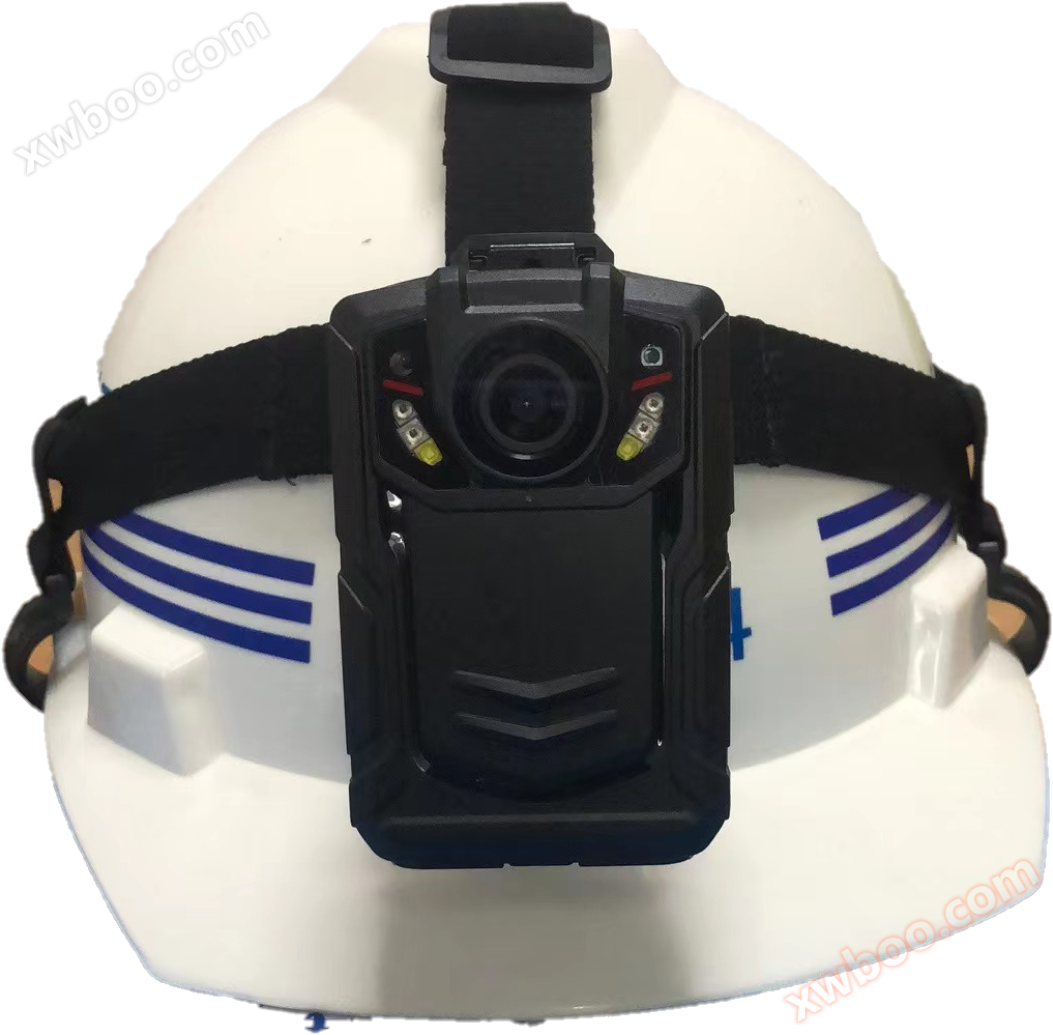
Video Location Security Cap
KPV400 Video Security Hat User Guide Product Introduction Video Security Hat ye raan ye luui ye, ye raan ye luui ye, ye raan ye luui ye, ye raan ye lu
Detalji proizvoda
KPV400Video security capLɔnadɛBuk
Produk Profile
Video security hat ye terminal de kunnafoniya ye kɔc ye kɔc ye kɔc ye kɔc ye kɔc ye kɔc ye kɔc ye kɔc ye kɔc ye kɔc ye kɔc ye kɔc ye kɔc ye kɔc ye kɔc ye kɔc ye kɔc A kony bɛ video, audio, capture, 3G/4G network transmission (ye 3G/4G function products), GPS location, etc. Equipment operation is simple, comes with LCD display and operation keys, light weight, small size, easy to carry, mainly used in building site inspection, traffic police enforcement, fire inspection, city administration enforcement, tobacco enforcement etc. the need to record inspection or inspection process. Equipment operation is simple, comes with LCD display and operation keys, light weight, small size, easy to carry, mainly used in building site inspection, traffic police enforcement, fire inspection, city administration enforcement, tobacco enforcement etc. the need to record inspection or inspection process.
YɛlKarakteristika
Equipment structure compact, weight reasonable, easy to carry, completely satisfying one-man mobility inspection forensic needs. Equipment structure compact, weight reasonable, easy to carry, completely satisfying one-man mobility inspection forensic needs. Equipment structure compact, weight reasonable, easy to carry, completely satisfying one-man mobility inspection forensic needs.
3G/4G transfer module built-in, video monitoring remote, audio listening, and remote location via GPS. 3G/4G transfer module built-in, video monitoring remote, audio listening, and remote location via GPS. 3G/4G transfer module built-in, video monitoring remote, audio listening, and remote location via GPS. (Tɛ̈n yenë 3G/4G tɔ̈u thïn)
GPS module ye tɔ̈ɔ̈u në ye mɛn, ye tɔ̈ɔ̈u në ye mɛn në ye mɛn në ye mɛn në ye mɛn në ye mɛn në ye mɛn në ye mɛn në ye mɛn në ye mɛn në ye mɛn në ye mɛn në ye mɛn në ye mɛn në ye mɛn në ye A lëu ba tɛ̈n ye tɛ̈n ye tɛ̈n ye tɛ̈n ye tɛ̈n ye tɛ̈n ye tɛ̈n ye tɛ̈n ye 3G/4G.
Equipment based on three defense design, has a better waterproof, dustproof, and earthquake resistance. Equipment is based on three defense designs, has a better waterproof, dustproof, and earthquake resistance. Equipment is based on three defense designs, has a better waterproof, dustproof, and earthquake resistance.
Kä ye kek looi aye kek tɔ̈u në lithium battery, ye kek tɔ̈u në kaam juëc yiic, ye kek tɔ̈u në kaam juëc yiic, ye kek tɔ̈u në kaam juëc yiic (bateri 2). Video change battery will not shut down (Video change battery won't shut down) (Video change battery won't shut down) (Video change battery won't shut down) (Video change battery won't shut down) (Video change battery won't shut down)
A tɔ̈u në 64G.
400W pixel camera, video recording support 1080p and other resolution video recording. Ka fotow ye 4000w, 3200w, 200w, ku pixels ye dɛmɛ.
Ka ye tɛ̈n ye tɛ̈n ye tɛ̈n ye tɛ̈n ye tɛ̈n ye tɛ̈n ye tɛ̈n ye tɛ̈n ye tɛ̈n ye tɛ̈n ye tɛ̈
Filter switcher duuɔ̈ɔ̈p, ye kɛ̈l ye kɛ̈l ye kɛ̈l ye kɛ̈l ye kɛ̈l ye kɛ̈l ye kɛ̈l ye kɛ̈l
Video file name be date, time, video type, etc. be data archiving, retrieval, etc.
A lëu ba video, audio, audio, foto, ku wël kɔ̈k tɔ̈u yen tɔ̈u yen tɔ̈u yen tɔ̈u yen tɔ̈u yen tɔ̈u yen tɔ̈u yen tɔ̈u yen tɔ̈u yen tɔ̈u yen tɔ̈u yen.
Support button one-click alarm, në ye thaa kënë, device abï alarm ya looi në man ku bï ya upload në platform.
Video file ye gɔ̈ɔ̈r ye gɔ̈ɔ̈r ye gɔ̈ɔ̈r ye gɔ̈ɔ̈r ye gɔ̈ɔ̈r ye gɔ̈ɔ̈r.
Device be se ka video security cap number, user number, time date ye nyuɔɔth.
A tɛ̈n yenë a tɛ̈n yenë a tɛ̈n yenë a tɛ̈n yenë a tɛ̈n yenë a tɛ̈n yenë a tɛ̈n yenë a tɛ̈n yenë a tɛ̈n Launch, recording, recording status has a clear light indication, standby status indicates as green, recording status indicates asOrangeA tɛ̈n yenë a tɛ̈n ye tɛ̈n ye tɛ̈n ye tɛ̈n ye tɛ̈n ye tɛ̈n ye tɛ̈n.
Equipment tɔ̈u ne alarm ye cɔl abnormal, agut cï battery low voltage alarm, storage full alarm etc.
Log function: ye software bɛ̈n ya tɔ̈ɔ̈u në logs, switch, audio, video, foto, GPS location, etc.
Keys Description
Nyuɔ key |
Ikon |
Metod |
Funksiɔn |
Power Key |
|
Press koor |
Ha tɛ̈n yenë yen tɛ̈n yen tɛ̈n yen tɛ̈n yen tɛ̈n yen tɛ̈n yen tɛ̈n yen tɛ̈n yen/Fɛɛrɛ de screen saver; Tɛ̈n tɛ̈n tɛ̈n tɛ̈n tɛ̈n tɛ̈n tɛ̈n tɛ̈n tɛ̈n tɛ̈n1Sekond start. |
Long Press |
Ha tɛ̈n yenë yen tɛ̈n yen tɛ̈n yen tɛ̈n yen tɛ̈n yen tɛ̈n yen tɛ̈n yen tɛ̈n yen3A seconds lëu bɛ̈n tɔ̈ɔ̈u. |
||
Keys |
PTT |
Long Press |
Lɔ̈k jam. |
|
Video Key |
|
Press koor |
Në tɛ̈n yenë yen tɔ̈u thïn, ka tɛ̈n yenë yen tɔ̈u thïn, ka tɛ̈n yenë yen tɔ̈u thïn, ka tɛ̈n yenë yen tɔ̈u thïn, ka tɛ̈n yenë yen Tɛ̈n ye tɛ̈n ye tɛ̈n ye tɛ̈n ye tɛ̈n ye tɛ̈n ye tɛ̈n ye tɛ̈n ye tɛ̈n ye t |
Long Press |
Ha tɛ̈n yenë yen tɛ̈n yen tɛ̈n yen tɛ̈n yen tɛ̈n yen tɛ̈n yen tɛ̈n yen tɛ̈n yen3Seconds can generate manual alarm and start video recording video and can pass3G/4GLëk wɛbthait në platform. |
||
|
Foto Key |
|
Press koor |
Në tɛ̈n yenë yen tɛ̈n yenë yen tɛ̈n yenë yen tɛ̈n yenë yen tɛ̈n yenë yen tɛ̈n yenë yen tɛ̈n yenë yen tɛ̈ Lɔ̈k ba fotow tɔ̈ɔ̈u ka tɔ̈ɔ̈u ka tɔ̈ɔ̈u ka tɔ̈ɔ̈u ka tɔ̈ɔ̈u ka tɔ̈ɔ̈u. |
Long Press |
Ha tɛ̈n yenë yen tɛ̈n yen tɛ̈n yen tɛ̈n yen tɛ̈n yen tɛ̈n yen tɛ̈n yen tɛ̈n yen3Sekond lëu/Ka lamba bɛɛ̈ɛ̈r tɔ̈ɔ̈u; Tɛ̈n ye tɛ̈n ye tɛ̈n ye tɛ̈n ye tɛ̈n ye tɛ̈n ye tɛ̈n ye tɛ̈n ye tɛ̈n ye tɛ̈n |
||
Keys recording |
|
Press koor |
A lëu bï a gɔ̈ɔ̈r në tɛ̈n yenë a tɛ̈n yenë a tɛ̈n yenë a tɛ̈n yenë a tɛ̈n yenë a tɛ̈n yenë a tɛ̈n yenë a |
|
Laser Infrared |
|
Press koor |
Ka tɛmɛ ka tɛmɛ ka tɛmɛ ka tɛmɛ ka tɛmɛ ka tɛmɛ ka tɛmɛ ka tɛmɛ ka tɛmɛ ka tɛmɛ/Laser ye foto ye tɔ̈ɔ̈u ye tɔ̈ɔ̈u ye tɔ̈ɔ̈u ye tɔ̈ɔ̈u ye tɔ̈ɔ̈u ye tɔ̈ɔ̈u ye tɔ̈ɔ̈u. |
Long Press |
Ka tɛmɛ ka tɛmɛ ka tɛmɛ ka tɛmɛ ka tɛmɛ ka tɛmɛ ka tɛmɛ ka tɛmɛ ka tɛmɛ ka tɛmɛ3Ka tɛmɛ seconds ka tɛmɛ night infrared mode, ka tɛmɛ video wala foto. |
||
Fn/SOS |
|
Press koor |
A tʋmɛ tɛ̈n tɛ̈n tɛ̈n tɛ̈n tɛ̈n tɛ̈n tɛ̈n tɛ̈n tɛ̈n. |
SIM |
SIM |
Socket |
Lɔ̈kSIMMobile Traffic Card, ye kɛ real-time transfer function. |
USB |
USB |
Kɔntaktɛr |
Data transfer interface, charging interface, external cameras, intercom, etc. |
Keys menu/Key konfirmation |
|
Press koor |
Tɛ̈n tɛ̈n tɛ̈n tɛ̈n tɛ̈n tɛ̈n tɛ̈n tɛ̈n tɛ̈n tɛ̈n tɛ̈n tɛ̈ Ka tɛmɛ ka tɛmɛ ka tɛmɛ ka tɛmɛ ka tɛmɛ ka tɛmɛ ka tɛmɛ ka tɛmɛ ka tɛmɛ ka tɛmɛ ka tɛmɛ. |
Long Press |
Click long to switch the video resolution. Click long to switch the video resolution. Click long to switch the video resolution. |
||
Keys up |
|
Press koor |
Ka tɛmɛ ka tɛmɛ ka tɛmɛ ka tɛmɛ ka tɛmɛ ka tɛmɛ ka tɛmɛ ka tɛmɛ ka tɛmɛ ka tɛmɛ ka tɛmɛ ka tɛmɛ Lɔ̈k foto në Wide Angle mode (Zoom out) |
Keys dɔ |
Press koor |
Ka tɛmɛ ka tɛmɛ ka tɛmɛ ka tɛmɛ ka tɛmɛ ka tɛmɛ ka tɛmɛ ka tɛmɛ ka tɛmɛ ka tɛmɛ ka tɛmɛ ka tɛmɛ Lɔ̈k foto në Wide Angle mode (Zoom in) |
|
Lëk/Lɛk |
Press koor |
Ha menu settings wala file selection, click short to return to the previous level. Tɛ̈n tɛ̈n tɛ̈n tɛ̈n tɛ̈n tɛ̈n tɛ̈n tɛ̈n tɛ̈n tɛ̈n tɛ̈n tɛ̈n tɛ̈n tɛ̈n tɛ̈ |

Tɛ̈n tɛ̈n tɛ̈n tɛ̈n tɛ̈n tɛ̈n tɛ̈n tɛ̈n tɛ̈n
Lampu |
Status lamp |
Status bayanna |
Lampu1 |
Blue |
Charge |
Lampu2 |
Green |
Free |
Red |
Video |
|
Orange |
Rekord |
Ciyaat Basic
1Open/Ka'm
Press koor "Power Key"1Sekondi, masini ye tɛ̈ɛ̈r ye tɛ̈ɛ̈r ye tɛ̈ɛ̈r ye tɛ̈ɛ̈r ye tɛ̈ɛ̈r ye tɛ̈ɛ̈r ye tɛ̈ɛ̈r ye tɛ̈ɛ̈r ye tɛ3Second, ka tɛmɛ ka tɛmɛ ka tɛmɛ ka tɛmɛ ka tɛmɛ ka tɛmɛ ka tɛmɛ ka tɛmɛ ka tɛmɛ ka tɛmɛ; Ha tɛ̈n yenë yen tɛ̈n yenë yen tɛ̈n yenë yen tɛ̈n yenë yen tɛ̈n yenë yen tɛ̈n yenë yen tɛ̈n yenë yen tɛ̈n yen/Screensaver dɔ̈ɔ̈r.
2Video
Ka bɛ̈n, masin ee lɔ në tɛ̈n yenë yen tɛ̈n yenë yen tɛ̈n yenë yen tɛ̈n yenë yen tɛ̈n yenë yen tɛ̈n yenë yen tɛ̈n yenë yen tɛ̈n yenë yen tɛ̈n yenë yen tɛ̈n yenë yen2Red, long bright, on a recording state, press the "video key" again, the machine vibrates briefly and accompanies the prompt sound, ending and automatically saving the recording file. Long bright red, on a recording state, press the "video key" again, the machine vibrates briefly and accompanies the prompt sound, ending and automatically saving the recording file. Tɛmɛ kaam ka tɛmɛ ka tɛmɛ ka tɛmɛ ka tɛmɛ ka tɛmɛ ka tɛmɛ ka tɛmɛ ka tɛmɛ ka tɛmɛ3Polis alarm Ku bɛ̈ɛ̈i bɛ̈ɛ̈i bɛ̈ɛ̈i bɛ̈ɛ̈i bɛ̈ɛ̈i bɛ̈ɛ̈i.
Në ye mɛn, ka "video key" tɔ̈ɔ̈u, ka "video key" tɔ̈ɔ̈u, ka "video key" tɔ̈ɔ̈u ka video tɔ̈ɔ̈u.
To yïn ye foto tɔ̈ɔ̈u në wɛ̈ɛ̈r yic, yïn adhil ba "infrared key" tɔ̈ɔ̈u, ku yïn adhil ba infrared light tɔ̈ɔ̈u në wɛ̈ɛ̈r yic, ku yïn adhil ba video tɔ̈ɔ̈u në wɛ̈ɛ̈r yic
Ka tɛmɛ video encryption function, video encrypted can be played in local,PCEnd playback wɛ̈t bï raan dɔ̈ɔ̈r ye wɛ̈t bï wɛ̈t bï wɛ̈t bɛ̈n looi.
3、 Rekord
Ka bɛ̈n, masin ee lɔ̈ɔ̈m në tɛ̈n yenë yen tɛ̈n yenë yen tɛ̈n yenë yen tɛ̈n yenë yen tɛ̈n yenë yen tɛ̈n yenë yen tɛ̈n yenë yen tɛ̈n yenë yen tɛ̈n yenë yen tɛ2Always bright orange, on the machine screen tells you that there is a recording status picture, on the recording status press again the "recording key", the machine vibrates briefly and accompanies the prompt sound after it ends and automatically saves the recording file.
4Piksa foto
Ka bɛ̈n, masin ee lɔ̈ɔ̈m në tɛ̈n yenë yen tɔ̈u thïn në tɛ̈n yenë yen tɔ̈ thïn në tɛ̈n yenë yen tɔ̈ thïn në tɛ̈n yenë yen tɔ̈ thïn2Red bright, machine short vibration and accompanied by a photo prompt sound and the screen displays the word "Taking photo processing"... until the word disappears after finishing taking the photo and automatically saving the taken picture. Red bright, machine short vibration and accompanied by a photo prompt sound and the screen displays the word "Taking photo processing"... until the word disappears after finishing taking the photo and automatically saving the taken picture. Lɔ̈ɔ̈m ë wɛ̈ɛ̈r në wɛ̈ɛ̈r cïï wɛ̈ɛ̈r cïï wɛ̈ɛ̈r cïï wɛ̈ɛ̈r cïï wɛ̈ɛ̈
5Infrared Camera Function
"Infrared light key" ye tɔ̈ɔ̈u ka tɔ̈ɔ̈u ka tɔ̈ɔ̈u ka tɔ̈ɔ̈u ka tɔ̈ɔ̈u ka tɔ̈ɔ̈u ka tɔ̈ɔ̈u/GɛlInfrared light, ye rot looi në ɣän kɔ̈k peei, ye rot looi në ɣän kɔ̈k peei, ye rot looi në ɣän kɔ̈k peeiWalisa mode (Auto mode), color restore mode bɛ dɔgɔya, bɛ dɔgɔya, bɛ dɔgɔya, bɛ dɔgɔya, bɛ dɔgɔya, bɛ dɔgɔya, bɛ dɔgɔyaLuɔr, yen ye awo normal ye.
6Yik
"Back key" ye tɔ̈ɔ̈u në menu de playback, ye tɔ̈ɔ̈u në "Up and Down" ye tɔ̈ɔ̈u në folder de video, foto, ku audio ye tɔ̈ɔ̈u në playback, ye tɔ̈ɔ̈u në "Confirm key" ye tɔ̈ɔ̈u në folder de directory ye tɔ̈ɔ̈u në playback.
6.1 Video playback
Video directory ye tɛ̈n tɛ̈n tɛ̈n tɛ̈n tɛ̈n tɛ̈n tɛ̈n tɛ̈n tɛ̈nFolder, press "Confirm key" to openA folder, yen tɔ̈u yenVideo file ye tɔ̈ɔ̈u, press "Yes""Play Video, Record Files"Format yeaviYe.
6.2 Fotowa
Fotow ka tɔ̈ɔ̈u ka tɔ̈ɔ̈u ka tɔ̈ɔ̈u ka tɔ̈ɔ̈u ka tɔ̈ɔ̈u ka tɔ̈ɔ̈uFolder, press "Confirm""Open a folder" button,İçinde şu wagt çekildi.Foto file, press "Confirm key"Nïŋ foto, foto file formatjpgYe.
6.3 Rekord playback
Wakat juëc tɛ̈n tɛ̈n tɛ̈n tɛ̈n tɛ̈n tɛ̈n tɛ̈n tɛ̈n tɛ̈nFolder segment, press "Confirm key"Lɔ̈k folder dɛ̈tAudio file ye gɔ̈t në ye thaa kënë,"Confirm key" ye gɛlɛ ka gɛlɛ ka gɛlɛ ka gɛlɛ ka gɛlɛ ka gɛlɛ ka gɛlɛ ka gɛlɛ ka gɛlɛ ka gɛlɛFormat file recording yewavYe.
7Menu Settings
Note: After booting, in the standby state, press the "menu key", go to the parameter setting interface, select the parameter option you want to change, press the "confirmation key" to enter the option, press the "up, down key" to select the appropriate parameter, select the finished after the "confirmation key" to complete the parameter change, press the "up, down key" to modify other options. "Return key" ye tɔ̈ɔ̈u bï yïn ya tɔ̈ɔ̈u bï yïn ya tɔ̈ɔ̈u bï yïn ya tɔ̈ɔ̈u.
7.1 Video Resolution
Video Resolution tɔ̈u yenTFCard storage, mainly for local front-end HD video recordings, default1080P ((1920*1080)Ye.
7.2 Video frame rate
Video frame rate default30Ka5~30A lëu ba frame kuanycök.
7.3 Video Kalite
Video quality default is high, ultra high, high, medium, low. Video quality default is high, ultra high, high, medium, low. Video quality default is high, ultra high, high, medium, low.
Aw ye kuanycök në ɣän ka ŋuan ye kɔc kuanycök në ɣän ka ŋuan ye kɔc kuanycök në ɣän ka ŋuan ye kɔc kuanycök në ɣän ka ŋuan ye kɔc kuanycök në ɣän ka ŋuan ye kɔc kuanycök në ɣän ka ŋuan ye kɔc kuanycök në ɣän ka ŋuan ye kɔc kuanycök në ɣän ka ŋuan.
Video Kalite |
Yüksek |
Yüksek |
Middle |
Low |
Bitrate |
8M |
6M |
4M |
3M |
7.4 Resolution Live
Live Broadcast Resolution for Device Remote Transfer, default720P(1280*720). A wɛrɛ1080P ((1920*1080)kuVGA(640*360(A lëu ba kuanycök.
7.5 Live frame rate
Live frame rate default25Ka5~30A lëu ba frame kuanycök.
7.6 Kalite Live
Live Broadcast Quality default medium, there are four levels to choose from: super high, high, medium, and low. Live Broadcast Quality default is medium, there are four levels to choose from: super high, high, medium, and low.
Yüksek |
Yüksek |
Middle |
Low |
|
1080P |
4 M |
3 M |
2 M |
1 M |
720P |
3 M |
2M |
1.5M |
800K |
VGA |
1.5 M |
1M |
700K |
350K |
7.7 Live stream mode
Live streaming mode default is smooth first, there are two modes of smooth first, image quality first. Live streaming mode default is smooth first, there are two modes of smooth first, image quality first. Live streaming mode default is smooth first, there are two modes of smooth first, image quality first.
7.8 Foto size
Foto size default1920*1080Yïn.1920*1072~8640*4752Yïn alëu ba foto 6 sugandi.
7.9 Modɛl Wide Angle
Wide angle mode has "standard" and "wide angle" two options, the standard mode adds distortion correction to make the image more real and accurate, the wide angle mode has a larger angle of lens, and the lens coverage is wider. Wide angle mode has "standard" and "wide angle" two options, the standard mode adds distortion correction to make the image more real and accurate, the wide angle mode has a larger angle of lens, and the lens coverage is wider.
7.10 USBTʋma Mode
USBWorkmode default is automatic, divided into automatic, host and device three modes, for charging and data transfer etc. Workmode default is automatic, divided into automatic, host and device three modes, for charging and data transfer etc. Workmode default is automatic, divided into automatic, host and device three modes, for charging and data transfer etc
7.11 3G/LTE
3G/LTEDefault mode ye tɛ̈n ye tɛ̈n ye tɛ̈n ye tɛ̈n ye tɛ̈n ye tɛ̈n ye tɛ̈n ye tɛ̈n ye3G/4GA kaar de network ye tɛmɛ.
7.12 WIFI
WIFIDefault deactivated state for controlling devices (ye tɛ̈n ye tɛ̈n ye tɛ̈n ye tɛ̈n ye tɛ̈n ye tɛ̈n ye tɛ̈n ye)WIFIKa hotspot ye tɛmɛYe.
Password default ye device hotspot ye:12345678Ye.
7.13 GPS
GPSSet default open status to open and shut down machineGPSFunksiɔn tɔ̈u.
7.14 Screen brightness
Screen brightness default is high, you can set different screen brightness according to different situations, there are high, medium, low, automatic four different modes. Screen brightness default is high, you can set different screen brightness according to different situations, there are high, medium, low, automatic four different modes. Screen brightness default is high, you can set different screen brightness
7.15 Automatic shutdown
Auto shutdown default30Sekond. 关闭,30Sekond,1minit,3minit,5A lëu bï yɔ̈ɔ̈r në minit 5 yiic.
7.16 Modɛl foto
Lɔ̈ɔ̈i de foto ye rot looi në manual ku automatic mode, ku yïn alëu ba lɔ̈ɔ̈i de foto ye rot looi.
7.17 Mode de gɔ̈ɔ̈r
Na cï yɔ̈ɔ̈r de gɔ̈ɔ̈r de gɔ̈ɔ̈r de gɔ̈ɔ̈r de gɔ̈ɔ̈r de gɔ̈ɔ̈r de gɔ̈ɔ̈r de gɔ̈ɔ̈rIMPDokumen.
7.18 Infrared switch
Infrared switch divided into manual and automatic two modes optional, under automatic mode. Infrared switch divided into manual and automatic two modes optional, under automatic mode. Infrared switch divided into manual and automatic two modes optional, under automatic mode.ApparatuA lëu bï rot waar ë rot ë rot ë rot ë rot ë rot ë rot ë rot ë rot ë rot ë rot ë rot ë rot ë rot ë rot ë rot ë rot ë rot.
7.19 Sensitivity picker
Picker sensitivity lëu0Ajuiɛɛr10A ye dɔŋ a ye dɔŋ a ye dɔŋ a ye dɔŋ a ye dɔŋ a ye dɔŋ a ye dɔŋ a ye dɔŋ a ye dɔŋ a ye dɔŋ a ye dɔŋ.
7.20 Volume ku jam
Loudspeaker lëu bɛ̈n0Ajuiɛɛr10Volume default ee9. A ye tɛ̈ɛ̈r tɛ̈ɛ̈r tɛ̈ɛ̈r tɛ̈ɛ̈r tɛ̈ɛ̈r tɛ̈ɛ̈r tɛ̈ɛ̈r tɛ̈ɛ̈r t
7.21 Vibration tips
A default ye Open.
7.22 Waktu Sync
Open Time Synchronization bɛ se ka tɛmɛ tɛmɛ tɛmɛ tɛmɛ tɛmɛ tɛmɛ tɛmɛ tɛmɛ tɛmɛ tɛmɛ tɛmɛ.
7.23 Audio dɔ
Audio ye raan ye raan ye raan ye raan ye raan ye raan ye raan ye raan ye raan ye raan ye raan ye raan ye raan ye raan ye raan ye raan ye raan ye raan ye raan ye raan ye raan ye raan ye raan ye raan ye raanKä ye looi aye rot kuanycök.
7.24 Video segment
Video segmentation refers to packing a video file in the length of set time, default5Video file ye looi në minit.
7.25 Video encoding
Na cï yɔ̈ɔ̈r de video ye gɔ̈ɔ̈r, a wïc ba video ye gɔ̈ɔ̈r ya tɔ̈ɔ̈u në kɔmpiöta yic, ka bɛ̈n ya tɔ̈ɔ̈u në kɔmpiöta yic888888Ye.
7.26 Video Prerecorder
Video pre-recording acï bɛ̈n ya tɔ̈ɔ̈u. 关闭,5Sekond,10Sekond,20Sekundu 4A lëu ba kuany, të cenë yen luɔɔi looi,ApparatuGɛlɛ foto ye tïŋ
Loop ye cache gɛɛr.
7.27 Video-dɛ-dɛ-dɛ-dɛ-dɛ-dɛ-dɛ-dɛ-dɛ-dɛ-dɛ-dɛ-dɛ-dɛ
Video ye tɔ̈ɔ̈u,5Sekond,10Sekond,20A lëu bɛ yɔ̈ɔ̈r në seconds 4N'a tɔ̈u ka tɔ̈u ka tɔ̈u ka tɔ̈u ka tɔ̈u ka tɔ̈u ka tɔ̈u ka tɔ̈u ka tɔ̈u ka tɔ̈u ka tɔ̈u ka tɔ̈u ka tɔ̈u.
7.28 Laser Light & Language
Laser lamp default state is disabled, and begins working when it is turned on. Laser lamp default state is disabled, and begins working when it is turned on. Laser lamp default state is disabled, and begins working when it is turned on. Tɔŋ kënë ee Simplified Chinese.
7.29 Password gël
Na yɔ̈ɔ̈k password protection na yɔ̈ɔ̈k password na yɔ̈ɔ̈k na yɔ̈ɔ̈k na yɔ̈ɔ̈k na yɔ̈ɔ̈k na yɔ̈ɔ̈k na yɔ̈ɔ̈kLëk password888888Ye.
7.30 DisableUDisk
Default mode ye cɔk.USBLɔ̈k ë lëk ë lëk ë lëk ë lëk ë lëk ë lëk ë lëk ë lëk ë lëk ë lëk ë lëk ë lëk ë lëk ë lëk ë lëk ë lëk ë lëk ë lëkUDisk, kɔmpiöta cï lɔApparatutɛ̈n tɔ̈ɔ̈u.
7.31 Wël ë Device
Kunnafoni ye kɛ̈ɛ̈r ye kɛ̈ɛ̈r ye kɛ̈ɛ̈r ye kɛ̈ɛ̈r ye kɛ̈ɛ̈r yeMCUVersion, Product Serial Number, Manufacturer Code, Product Model,3G/LTE IPa,WIFI IPgateway,DNS0a,DNS1ServerIP(Registered Server)IPAdres), Server port (Device upload port),3G/4GModule,IMEIOperator, signal strength,WIFIModule,Wifi MACa,APA tɔŋ.
Онлайн разпит
-
Kontakti
-
Kompanija
-
Telefon
-
E-mail
-
WeChat
-
Kod provjere
-
Сједност поруки
-